◆ Main Screen
Learn about the layout and functions of the Vampir Main Screen.
■ Main Screen Layout
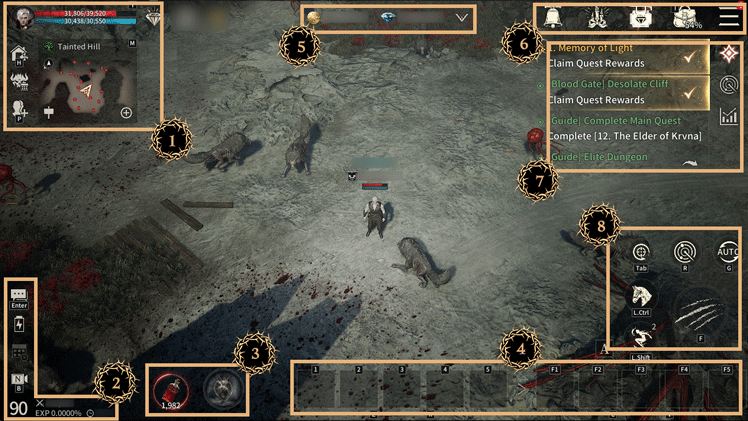
|
No. |
Description |
|
1 |
Character Info, Buffs, Map Info, Return to Village, Boss Info, Create Party, Create Raid |
|
2 |
Chat, Sleep Mode, Support Mode, Camera Settings, Level, Battle Power, EXP |
|
3 |
Potion Info, Adrenaline Gauge |
|
4 |
Quick Slots (Register Items & Skills) |
|
5 |
Resource Info |
|
6 |
Event, Shop, Bag, Menu Icons |
|
7 |
Quest Info, Target Info, Combat Log |
|
8 |
Targeting, Change Target, Detection, Auto-Progress, Mounts, Dash, ATK |
※The guide content and images are based on a test version and may differ from the actual game interface or be subject to change.