Codex
The codex holds information on the things you can collect in the game.
When you acquire a hunter, Shadow, or item for the first time, its codex entry is automatically unlocked.
You can obtain rewards from unlocked entries by viewing them in the Codex Menu.
[How to Access the Codex Menu]
- [Menu] ▶ [Codex]
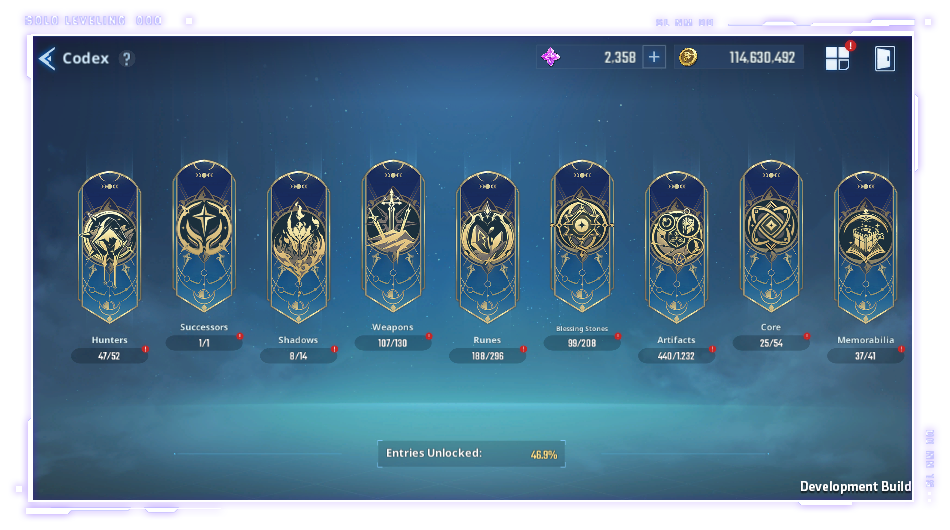
[Codex Guide]
- The codex is categorized into the following subcategories: Weapons, Shadows, Hunters, Artifacts, Runes, Blessing Stones, Memorabilia, Cores, and Successors, and you can view information about all of these collectibles here.
- You can view a codex entry by tapping on its associated icon.
- You can also view what percent of your codex has been completed.
|
Subcategory |
Description |
|
Weapons |
You can preview weapons' levels, advancement tiers, stats, skill effects, and max enhancement levels. |
|
Shadows |
You can preview your Shadows' ranks, upgrade statuses, skill effects, and max growth levels. |
|
Hunters |
You can view hunters' levels, advancement tiers, upgrade info, hunter exclusive weapons, and skills. |
|
Artifacts |
You can preview artifacts' levels, equipment scores, additional stat bonuses, set effect info, and max enhancement levels. |
|
Runes |
You can view runes' grades, quantity owned, acquisition paths, stats, and effect details. |
|
Blessing Stone |
You can view their levels, acquisition paths, grades, and stats. |
|
Memorabilia |
You can view the grade, quantity owned, acquisition path, and item info of memorabilia. |
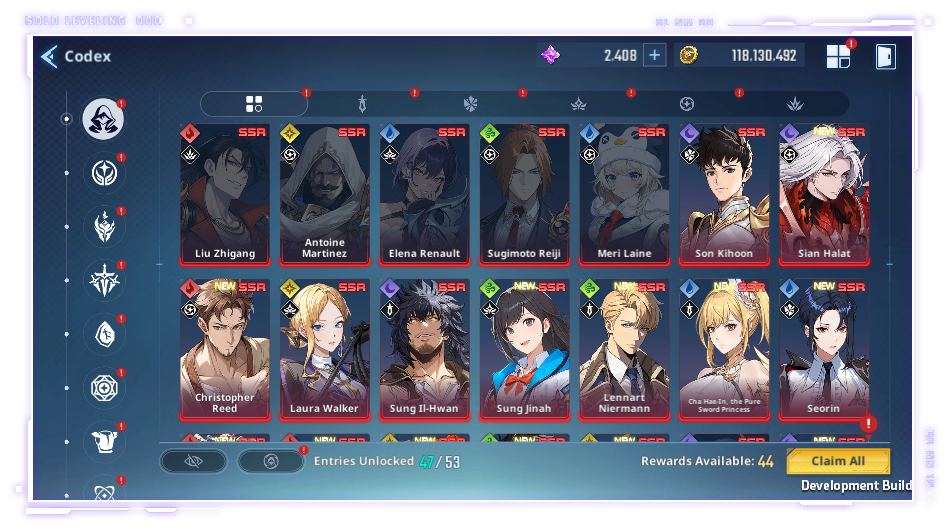
[Guide for Each Codex List]
- You can select any category in the codex to see the list of entries that can be unlocked.
- Codex entries are automatically unlocked when you acquire the respective character or item.
- When registering an entry in the codex for the first time or reaching a new growth tier, you can obtain rewards
by tapping the codex entry or the Claim All button in the bottom right.
*This guide was written based on the test version of the game, and the content may change in the future.