Training Room
In the Training Room, you and your hunters can train in various environments, allowing you to develop better strategies for real combat.
[How to Access the Training Room]
- [Lobby] ▶ [Training Room]
- [Menu] ▶ [Strategy Training] ▶ [Training Room]
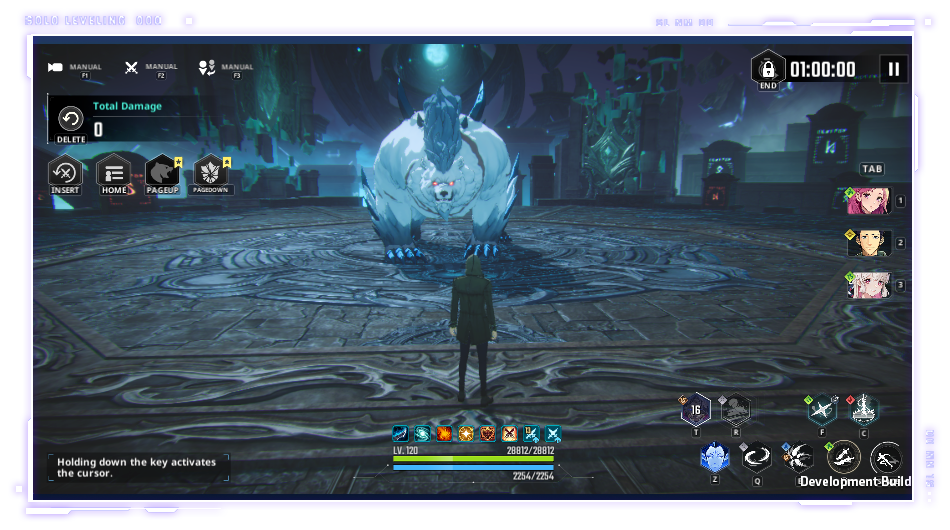
[Training Room Guide]
In the Training Room, you can reset the combat, start or stop a timer, enable enemy AI, and load presets, allowing you to simulate a variety of scenarios.
1) Total Damage counter: Allows you to check the total damage you have dealt so far. This counter can also be reset.
*When the Timer feature is enabled, only the total damage during the timer period will be tracked.
2) Training Room Settings: You can practice battles in diverse environments by adjusting the Training Room Settings, such as enemies, the timer, and other settings.
*You can change up to two icons displayed in the Favorites feature in Settings.
*Training room settings can be changed in the Pause menu.
3) Reset Battle: You can reset the battle to its initial state.
4) Timer: You can set the timer.
5) Recommended Skill Use Order (Hunter Mode only): The Combo Guide for the character in play can be turned on or off. You can also go to Training Room Settings > Other Settings to turn detailed Combo Guide options on or off.
6) Enable Enemy AI: The deployed enemy AIs can be enabled or disabled.
7) Load Preset: You can easily load a formation saved in your preset.
*Selecting Restore Default Formation from the preset list will revert the formation to the one set when first entering the Training Room.
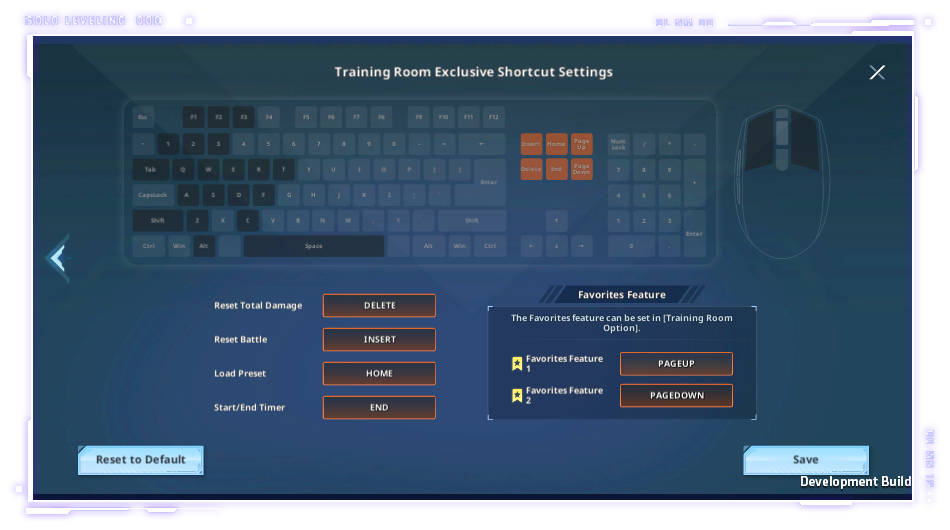
[Training Room Key Bindings]
- By going to the [Menu → Settings → Control Settings] page in the game, you can assign Training Room-specific shortcuts.
- You can change up to two icons displayed in the Favorites feature in the Training Room Option.
(Enable Recommended Skill Use Order / Enable Enemy Attack Mode / Apply Enemy Break Gauge / Enable Timer, etc.)
*You can access it by clicking the Arrow icon on the right on the [Existing Common Shortcut Settings] page.
*This guide was written based on the test version of the game, and the content may change in the future.