[Character Creation Screen]
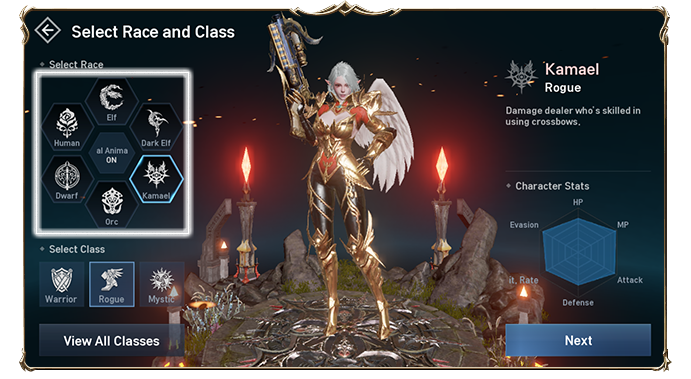
Selecting an empty character slot will move you to the Create Character screen.
Character Creation will go through the character's class selection phase.
You can select a class of the character by selecting from its own icons at the top of the screen.
The gender is automatically set when you select a class.
※ There is no difference in performance values according to gender.
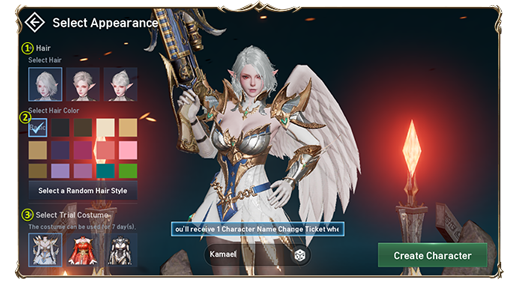
① You can choose character hair style.
② You can choose character hair color.
③ You can choose a costume with a 7 days duration.
④ You can put your desired character in-game name or used the dice icon for random in-game name.
⑤ After completing the steps 1 to 4, tap the Create Character button to complete character creation.
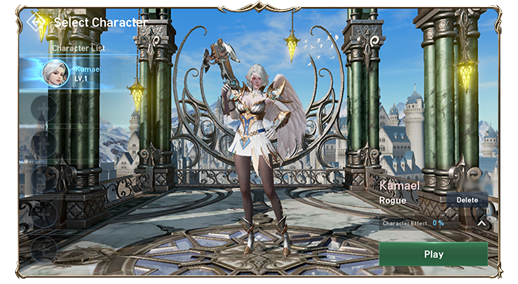
※ The costume that you selected can be used for 7 days. After this period, the costume will automatically be deleted.
[Important points when creating a class]
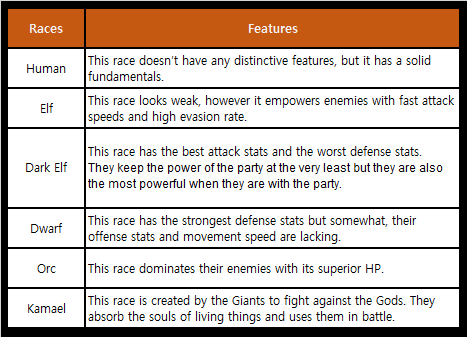
Lineage 2 Revolution is a world where six races coexist.
Each race has a significant characteristics of different abilities, and even classes of the same nature
have slightly different combat abilities.
Therefore, it is recommended that you choose a class that matches the player's characteristics
based on the unique abilities of each race.