King of Fighters All Star - Main Screen Layout Guide
Table of Contents
1. Main Screen Layout
1-1. Basic Menu
1-2. Event Menu
1-3. Growth Menu
1-4. Content Menu
1. Main Screen Layout
- The main screen layout is as shown below, grouped by their respective functions.
1-1. Basic Menu
- A menu normally shown at the top of the screen. The buttons correspond to general functions related to your account.

① Rank
- Your Account’s Rank is displayed here.
② Nickname
-Your League Match Rank, Guild Name, and Nickname are shown here.
③ Boost
- View applied event effects or buffs.
④ AP (Action Point)
-This bar displays the amount of AP in your possession.
⑤ Currency
- This window displays the value of currencies in your possession.
⑥ Chat
- You can chat with your Guild members.
⑦ Mission
- You can view your Daily Missions, Achievements, Event Missions, and Repeat Missions here.
⑧ Mailbox
- Check your Giftbox and Inbox here.
⑨ Menu
- View your Profile, Check-In Log, Community, Device, Help, Support, and Settings in this menu.⑩ Go to ⑩ Go to Lobby
- Immediately go to the main lobby by touching the button on the other content screen.
- This button is not available when in the main lobby.
1-2 Event Menu
- This is a banner showing the current events in progress. When tapped, you will be moved to the selected event.
1-3 Growth Menu
- Fighters and Battle Cards you own can be leveled up through this menu.

① Fighters
- This menu accesses Fighters, Fighter Soul, and Memory. You can salvage the Figher Souls and combine Memory.
② Battle Cards
- Your Battle Cards can be combined or sold.
③ Imprint Stone
- Your Imprint Stones can be combined or sold.
④ Summon
-Summon your Fighters and Battle Cards here.
⑤ Shop
- You can purchase various items using Rubies, Topaz, and other purchased items through this shop menu.
⑥ Formation
- Fighters can be set in each team slot.
⑦ Guild
- You can join a Guild and check the information of the Guild you have joined. You can participate in Guild Raid as well if you have joined a Guild.
⑧ Craft
- You can create fighters, battle cards, and items.
⑨ Exchange Shop
- You can exchange items or battle cards with coins obtained in various events.
⑩ Secret shop
- You can purchase various items using Gold or Rubies.
⑪ Fame
- You can use medals earned from playing Absolute War to enhance a stat of your choice.
⑫ Dispatch
- You can dispatch your Fighters away for a certain amount of time to collect rewards.
⑬ Collection
- You can display Badges and Souvenirs.
1-4 Content Menu
- This is the menu to access the main contents of the game.
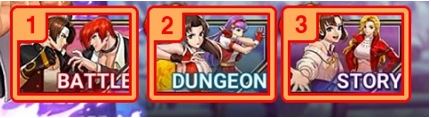
① Battle
- In the battle, you can play Infinite Battle, Championship, League Match, Rite of Passage, and Friendly match.
② Dungeon
- In the Dungeon, you can access Power Up Dungeon, Advent Dungeon, Challenge Dungeon, and Soul Quest.
③ Story
- In the story menu, you can access Stories, Epic Quest, and Events.